In Visual Basic, write a program to place an order from the restaurant menu in the table below. Use the form in the figure below, and write the program so that each group box is invisible and becomes visible only when its corresponding check box is checked. After the button is clicked, the cost of the meal should be calculated. (Note: The Checked property of the first radio button in each group should be set to True in its Properties window. This guarantees that a selection is made in each visible group box. Of course, when the cost of the meal is calculated, only the visible group boxes should be considered.) See the figure below for an example of what the program might look like at run time.
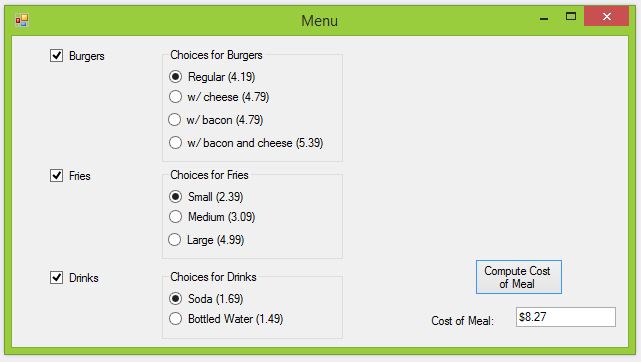
Suggested Control Names and Attributes:
| Name Property | Text Property | Container | Control Type | Notes |
| frmMenu | Menu | N/A | Form | Holds Controls |
| chkBurgers | Burgers | frmMenu | CheckBox | Box to choose burgers |
| chkFries | Fries | frmMenu | CheckBox | Box to choose fries |
| chkDrinks | Drinks | frmMenu | CheckBox | Box to choose drinks |
| grpBurgers | Choices for Burgers | frmMenu | GroupBox | Holds burger choice buttons |
| grpFries | Choices for Fries | frmMenu | GroupBox | Holds fries choice buttons |
| grpDrinks | Choices for Drinks | frmMenu | GroupBox | Holds drink choice buttons |
| radRegular | Regular (4.19) | grpBurgers | RadioButton | Choose regular burger |
| radCheese | w/ Cheese (4.79) | grpBurgers | RadioButton | Choose burger with cheese |
| radBacon | w/ Bacon (4.79) | grpBurgers | RadioButton | Choose burger with bacon |
| radBoth | w/ Bacon and Cheese (5.39) | grpBurgers | RadioButton | Choose burger with bacon and cheese |
| radSmall | Small (2.39) | grpFries | RadioButton | Choose small fries |
| radMedium | Medium (3.09) | grpFries | RadioButton | Choose medium fries |
| radLarge | Large (4.99) | grpFries | RadioButton | Choose large fries |
| radSoda | Soda (1.69) | grpDrinks | RadioButton | Choose soda |
| radWater | Bottled Water (1.49) | grpDrinks | Radio Button | Choose water |
| btnCompute | Compute Cost of Meal | frmMenu | Button | Trigger event to display total cost |
| txtCompute | N/A | frmMenu | TextBox | Displays total cost |
Hints:
- Be sure to place the control items in their appropriate containers according to the table above. For example, chkBurgers is only contained in the frmMenu. However, radCheese is contained in grpBurgers, which is contained in frmMenu.
- The the program starts running, the group boxes for burgers, fries and drinks should be invisible. To change them to visible when the boxes are checked, double click on the CheckBox in design mode. Code for a sub routine CheckChanged will populate. Edit the visible property of the appropriate group box.
Write the Code:
' Project: Restaurant Menu
' Description:  Simulates a burger shop from user input.
'    User decides from a menu of burgers, fries and a drink
'    Total cost is calculated and output to the screen with proper formatting

Public Class frmMenu
    ' declare global variables
    Dim totalCost As Double = 0
    Dim burgerCost As Double = 0
    Dim friesCost As Double = 0
    Dim drinkCost As Double = 0

    ' Make menu items visible when boxes are checked
    Private Sub chkBurgers_CheckedChanged(sender As Object, e As EventArgs) Handles chkBurgers.CheckedChanged
        If chkBurgers.Checked = True Then
            grpBurgers.Visible = True
        Else
            grpBurgers.Visible = False
        End If
    End Sub

    Private Sub chkFries_CheckedChanged(sender As Object, e As EventArgs) Handles chkFries.CheckedChanged
        If chkFries.Checked = True Then
            grpFries.Visible = True
        Else
            grpFries.Visible = False
        End If
    End Sub

    Private Sub chkDrinks_CheckedChanged(sender As Object, e As EventArgs) Handles chkDrinks.CheckedChanged
        If chkDrinks.Checked = True Then
            grpDrinks.Visible = True
        Else
            grpDrinks.Visible = False
        End If
    End Sub

    ' Calculate total cost of order
    Private Sub btnCompute_Click(sender As Object, e As EventArgs) Handles btnCompute.Click
        totalCost = 0
        If chkBurgers.Checked = True Then
            If radRegular.Checked = True Then
                burgerCost = 4.19
            ElseIf (radCheese.Checked = True) Or (radBacon.Checked = True) Then
                burgerCost = 4.79
            ElseIf (radBoth.Checked = True) Then
                burgerCost = 5.39
            End If
            totalCost += burgerCost
        End If

        If chkFries.Checked = True Then
            If radSmall.Checked = True Then
                friesCost = 2.39
            ElseIf (radMedium.Checked = True) Then
                friesCost = 3.09
            ElseIf (radLarge.Checked = True) Then
                friesCost = 4.99
            End If
            totalCost += friesCost
        End If

        If chkDrinks.Checked = True Then
            If radSoda.Checked = True Then
                drinkCost = 1.69
            ElseIf radWater.Checked = True Then
                drinkCost = 1.49
            End If
            totalCost += drinkCost
        End If

        ' output cost of order
        txtCompute.Text = CStr(totalCost.ToString("C"))
    End Sub
End Class